Battery, range, tyre pressures and vehicle status. Right in your Mac’s menu bar.
In this silent screen recording, the pointer selects the car icon in the macOS menu bar. The DashPeek panel opens for an iX3 M Sport. It shows a picture of the vehicle, a battery level of 21%, an estimated range of 39 miles, a last-updated time and a Refresh Vehicle control.
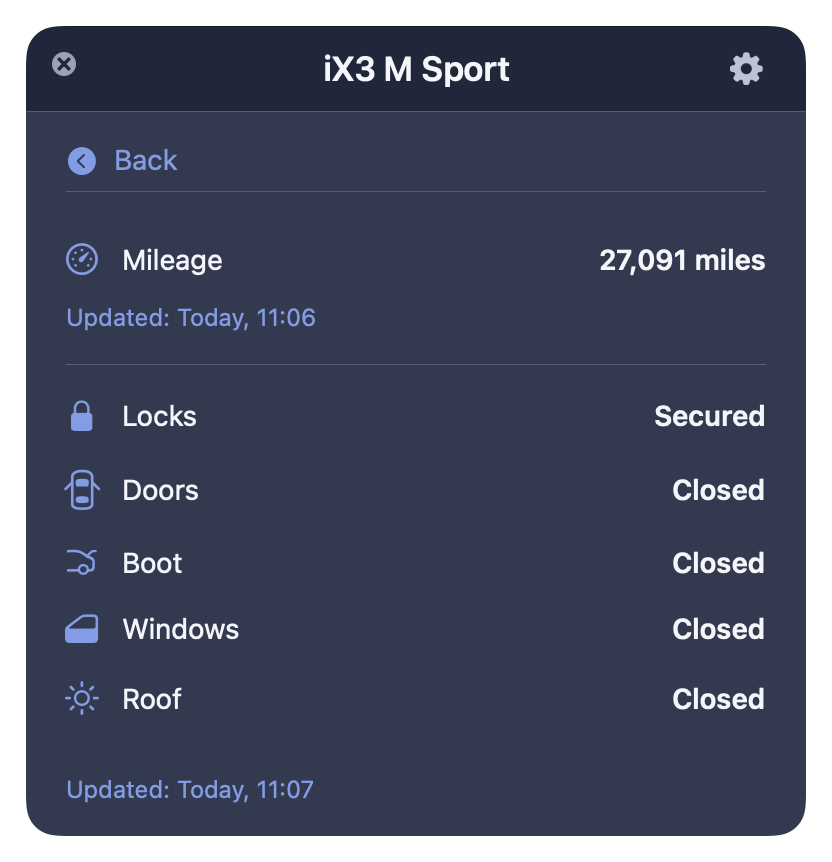
The pointer opens Overview. Mileage reads 27,496 miles, the locks are secured, and the doors, boot, windows and roof are closed. The pointer selects Back, then opens Tyres.
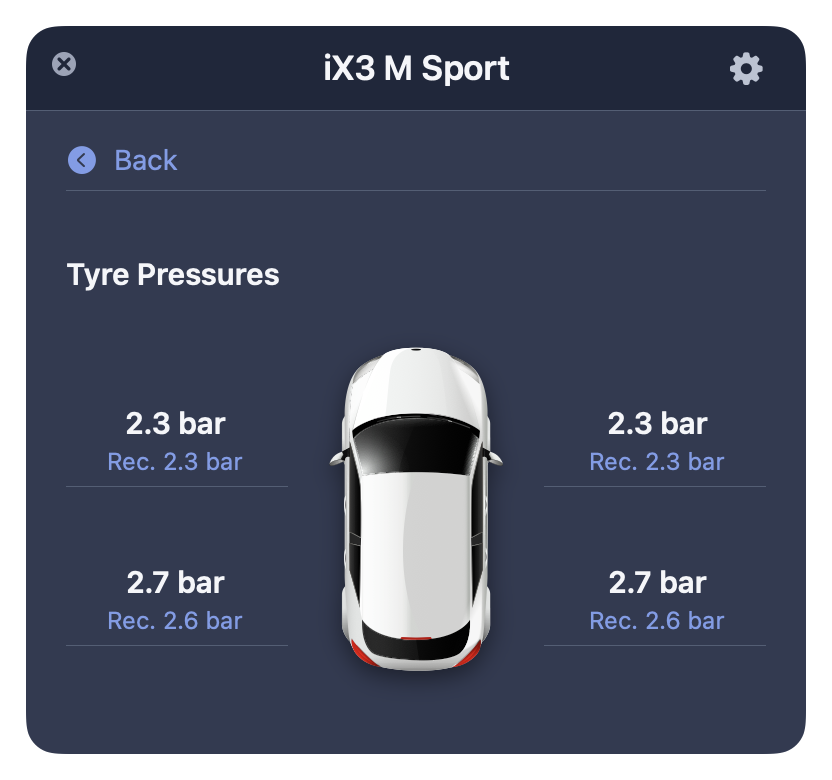
The Tyres view arranges four pressure readings around a top-down car diagram. Both front tyres read 2.3 bar, matching BMW’s recommendation. The rear tyres read 2.6 bar on the left and 2.7 bar on the right, against a recommendation of 2.6 bar for both. A note says the display includes last-known values.
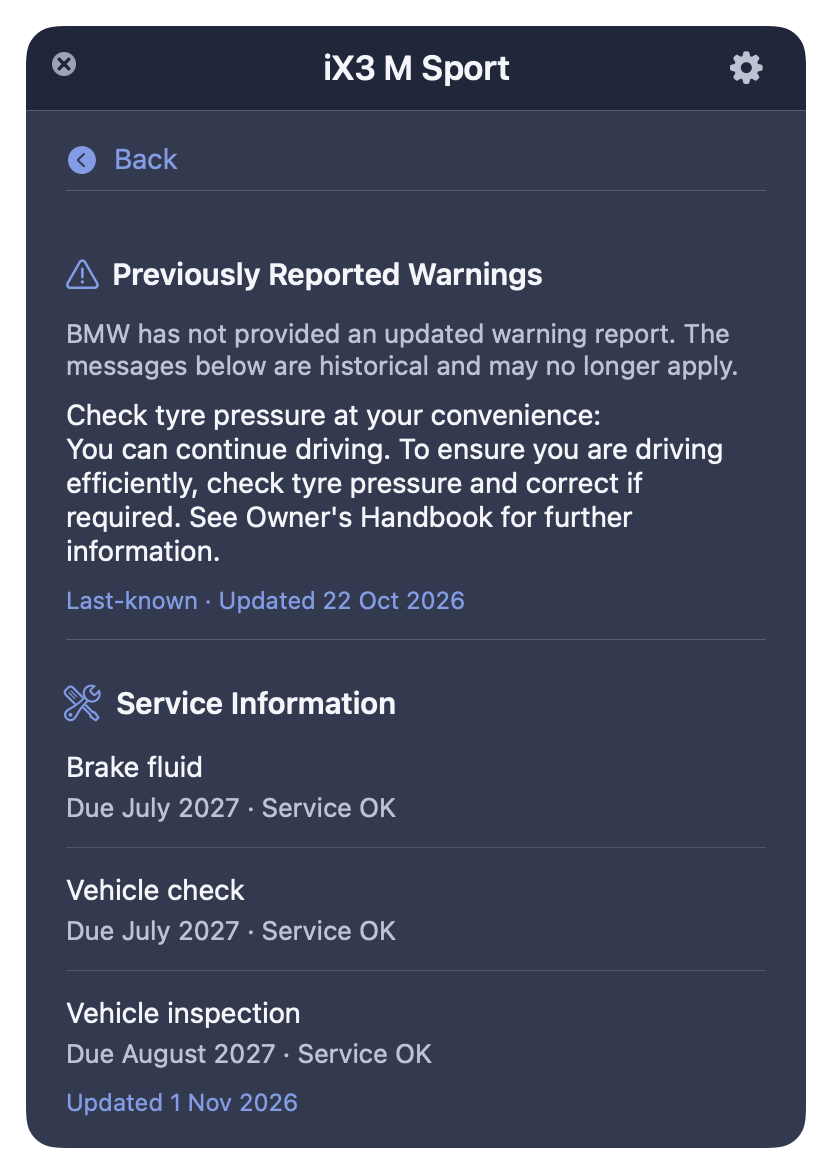
The pointer returns and opens Status. A previously reported warning advises checking the tyre pressure and says the vehicle can continue to be driven. The app notes that BMW has supplied no updated warning report, so the warning may no longer apply. The service list shows brake fluid and a vehicle check due in July 2027, and a vehicle inspection due in August 2027. All three are marked Service OK.
The pointer returns to the main panel and detaches it from the menu bar. The same battery and range readings appear in a floating window before the recording loops back to the desktop.
Essential information. Beautifully presented.
Check your BMW without reaching for your phone or interrupting what you’re doing. A simple, native Mac app that’s there whenever you need it.
Know your BMW is secure
Check your mileage, door locks, windows and boot without leaving your Mac.
Tyre pressures, simplified
See all four tyre pressures alongside BMW’s recommended values in a clear, visual layout.
Stay informed
View reported vehicle warnings and upcoming service requirements, all in one place.
Thoughtfully designed for your Mac.
Built exclusively for macOS, DashPeek sits quietly in your menu bar, ready whenever you need it. A lightweight, native app that feels like a natural part of your Mac.
How it works.
Connected to BMW
DashPeek uses BMW CarData to access information shared by your vehicle through BMW’s connected services.
Making sense of the data
Vehicle data is retrieved and translated into useful, easy-to-understand information.
From car to Mac
The information is presented through a native macOS interface, accessible directly from the menu bar.
Vehicle information reflects the latest data made available by BMW and may not represent the vehicle’s current state.
A small idea, built for the Mac.
DashPeek started with a simple thought: why reach for my phone to check my car when I spend much of my day working on a Mac?
As a designer with an appreciation for well-crafted Mac software, I wanted to create something that made everyday vehicle information more accessible, without adding unnecessary complexity.
What began as a small personal project became an exploration of native macOS development, connected vehicle technology and thoughtful interface design.
The result is DashPeek. A little app designed to do one thing well.
Interested in DashPeek?
DashPeek is currently a personal project, but I'd love to hear from other BMW owners who might find it useful.